 Bad Cat Prankster
Bad Cat Prankster
You might also like
 Bad Cat - Granny's ReturnPlay a mischievous cat completing chaotic tasks in Granny's house
 Cat and Granny 2First-person cat simulator: wreck the yard and drive granny crazy
 Cat and GrannyPlay as a mischievous cat wrecking granny's house in this 3D chaos sim.
 The Prank KingSneak through a cranky teacher's house and pull off creative pranks.
 Cat Life Simulator: Devil CatPlay a naughty cat trashing Grandma's house in first person
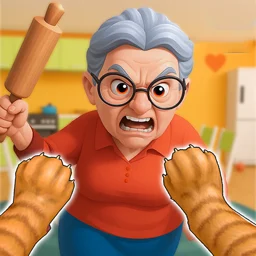
Bad Cat Prankster puts you in the paws of a troublemaking house cat with one goal: make granny's life as messy as possible. You scratch furniture, knock vases off shelves, swipe food from the kitchen, and bolt before she catches you.
It is free and runs in your browser, so there is nothing to install. Each room is a small playground of things to break, and the more daring your pranks, the closer granny gets to losing her patience.
Bad Cat Prankster quick facts
| Detail | Value |
|---|---|
| Genre | Simulation |
| Platform | Web browser (desktop & mobile) |
| Price | Free to play |
| Rating | 4.2/5 from 105,040 votes |
What is Bad Cat Prankster?
It is a 3D simulation game where you control a cat causing deliberate chaos inside a home. The core loop is simple: read your task list, sprint to the next target, knock it over or steal it, and stay out of granny's reach. Objectives stack up across the house, so a single room can hand you several pranks to pull before you move on. The angry grandma is the obstacle, and dodging her is half the fun.
Controls for the cat
You move with the keyboard and aim with the mouse. The cat has a wide set of actions, from picking up and throwing objects to the messier tricks that really push granny over the edge.
| Action | Key | What it does |
|---|---|---|
| Move | WASD or arrow keys | Walk the cat around the room |
| Look around | Move mouse | Aim the camera and view |
| Jump | Space | Hop onto shelves and counters |
| Sprint | Shift or C | Run faster to escape granny |
| Attack | E or left-click | Swipe and damage objects |
| Pick up | Q | Grab a nearby object |
| Throw | R or right-click | Hurl the object you carry |
| Task list | T | Check your current objectives |
| Pee | X | Mark the floor for extra mess |
| Poop | Z | Leave a present for granny |
| Dress up | L | Change the cat's look |
| Mini games | G | Open the side activities |
Picking up and throwing things
Press Q to grab an object and R or right-click to throw it. Use this to launch food, knock items off high spots, or just create a trail of wreckage. Throwing also lets you reach things from a distance when granny is standing between you and the target.
Pranks and ways to make a mess
The game gives the cat several ways to wreck a room. Mixing them keeps your task list moving and keeps granny chasing.
| Prank | How it works |
|---|---|
| Scratch and swipe | Attack furniture to leave it shredded |
| Knock over | Push vases and items off shelves and tables |
| Steal food | Grab food from the kitchen and run |
| Pee and poop | Leave mess on the floor with X and Z |
| Throw objects | Pick up items and hurl them across the room |
| Mini games | Open extra challenges with the G key |
Objectives and the task list
Press T at any time to see what the game wants you to do next. Tasks are spread across the house, and finishing them is what carries you from room to room. As you clear objectives the pranks get bolder and granny grows angrier, so the pressure builds the deeper you go. There is no need to memorize anything: the list tells you the goal, and you decide how to pull it off.
Is Bad Cat Prankster free and unblocked?
Yes. The game is free and loads straight in the browser, so you can play it at school or work wherever browser games are allowed. There is no download, no install, and no account to set up. If you want it on your phone, there is also a mobile app on Google Play and the App Store, but the browser version here needs nothing extra.
Tips for pulling off bigger pranks
- Keep the task list open with T so you always know the next target.
- Use Shift or C to sprint the moment granny spots you.
- Jump onto shelves and counters to reach items she cannot.
- Throw objects with R when something is out of paw's reach.
- Mix in pee and poop on the floor for quick extra mess.
- Plan a short escape route before you start wrecking a room.
Why the chaos works
The fun comes from the gap between a small house cat and the size of the mess it can make. You are not solving a serious puzzle, you are picking the most annoying thing to do next and getting away with it. Granny chasing you adds just enough risk that a clean getaway feels earned, and the long list of actions means two play sessions rarely look the same.
Take Bad Cat Prankster on the go
Bad Cat Prankster also has a mobile app. Keep playing here, or get it from Google Play and the App Store.